
Best Theme

Blogger Anniversary Template

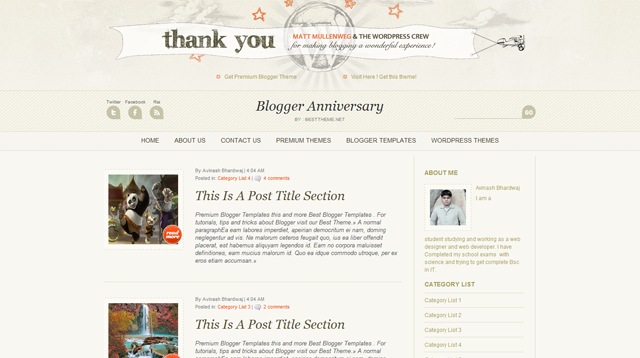
Blogger Anniversary Template is another beautiful blogger template which is modified and converted by us from WordPress template.

Blogger Anniversary Template is a blogger theme in blog style with latest feature and newly developed advance posting method. In this theme you need some basic formating in image style like every image should must be more than 620 px wide.  All template setting you will get in the template folder and if any problem happens please ask through comment.

So this template contains two version.

  1. Blogger-Anniversary-Full-Version
  2. Blogger-Anniversary-Simple-Version

5 Comments

  • Fromradio says

    how to add like a besttheme share button

  • Bobonk says

    Hi, thanks for share Blogger-Anniversary Theme. It’s great design. Ehmm, i have a question about this theme. How to add Share button??

    Thank you so much

  • Luigi says

    Hello, how can I change the header pic? Where is the “thank you” pic in the code? Thank you guys.

  • India says

    How do I change the header theme anniversary pic? please help!

  • Beth says

    Hi,
    This theme is really, really nice. thank you!

    I have one small issue that I can’t seem to figure out. On the main page of the blog the Post Thumbnails are squashing the image to make it to fit in the square box. Is there a way to keep it from distorting the image? Perhaps just using a portion of the original image and hiding the overflow?

    Thank you so much!
    Beth

Leave a reply

required

required

optional


You can use these html tags

<a href="" title=""> <abbr title=""> <acronym title=""> <b> <blockquote cite=""> <cite> <code> <del datetime=""> <em> <i> <q cite=""> <strike> <strong>

More item by :

More item by

admin

  • Repeatedly Helped protect Envato Marketplaces against copyright violations
  • Exclusive Author
  • sold_between_1_and_100_dollars
  • India
View Portfolio
Created 03-Jun-2011
Compatible Mozila Firfox Google Chrome Safari Opera Enternet Expolorar
Designer Site5
Layout 2 Column,Blog Design,Blogger Anniversary Template
Setup Instructions: Template Settings