
We have recently launched first forum which is specially created for blogger user who wants to get help and share their knowledge on blogger, WordPress, css, php and html. Please sign up for get help and share your knowledge. Best Theme Forum
Box Office Blogger Template

Share It


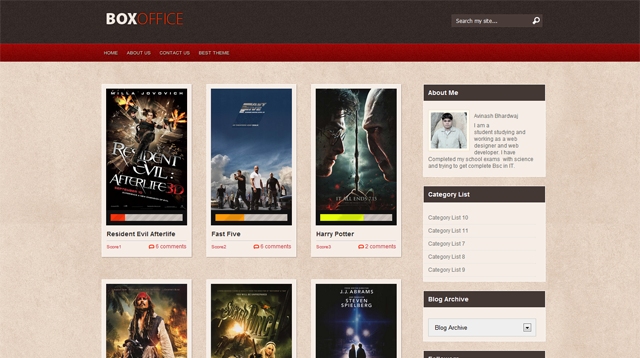
Box Office Blogger Template is another beautiful blogger template which is modified and converted by us from WordPress template.

This is a movie review template which is intent for use in any review like movie, video, book, software etc. This theme have a nice rating bar which will represent the rating given by author. I have added all instructions in the download folder and you can ask me any help via comment.

Due to large number of comments comming on every theme, we are unable to answer every comment and mail.So please leave your question / problem in respacted theme thread on our Best Theme Forum.

33 Responses so far.

  1. Oscar Semi says:

    Your idea about the score for each item is really creative. Thank you.

  2. Spot on with this write-up, I actually suppose this website needs way more consideration. I?ll probably be once more to learn much more, thanks for that info.

  3. great!
    i will use it to my movie blog :)
    thank’s!

  4. kean says:

    awesome, I used this in my new blog, thanks

  5. Al Tarancon says:

    Really great. I’m thinking about using this template, but not for movies. Is there any way i can change the text that appears above the bar in the post? The Movie Review Score?

  6. Paulo says:

    Can i make a RSS with my reviews?

  7. lex says:

    the word ” movie review” is not in the xml code

    how can we change the code … what you mean expand the code ??

    • Go to “Blogger Dashboard” > “Design Tab” > “Edit HTML” Tab >Now click “HTML Editor Box” top right corner and click “Expand Widget Templates Tab” > Now find ctrl+f “Movie review score” and change title with your new title.

  8. rIZ says:

    Avinas,

    I browsed your “blogger templates”

    TRULY AWESOME yar!!!

    Every template is neat, trendy, with outstanding design! WOW

    I’m planning to start a blog, will use on of your templates, of course with some tweaks and special thanks and link to your site and profile in footer.

    Thanks bro

  9. Ajith says:

    Hi,
    Im very much grateful for your theme. Its more like premium quality and it’s awesome. But i have a small trouble. Please help me:
    My front page posts are not aligning perfectly. Number of previews in a row is not 3 everytime.
    If you get some time, please visit my blog and help me solve the issue.

    Thanks a lot for the great theme!

    • Hi Ajith,
      Thanks a lot for commenting us and using our theme.
      Ok i have fixed the posts box alignment problem.
      You need to download again Box Office Template folder and upload it again.
      And also i have given instruction in template download folder you can read it if you get any problem with editing this template.
      Thanks again for choosing our template for your beautiful blog :)

      • Ram says:

        I have used this template in my blog . Still Alignment is not proper . I am using 16 posts per page and alignment looks not good .. I have downloaded your new template only from this page

  10. BOBZZ says:

    Hey how i can remove BOXOFFICE TITLE
    from Up
    the LOGO thing
    ?

  11. Gavin says:

    ummm, how do you rate the box?

  12. Zain says:

    Quick Edit Pencil not showing up in theme, and if I want to embed a image to all posts thro html, it doesnt work

  13. Trabelsy says:

    Hi,
    Begin by saying that I really like this template. It’s awesome!
    But i have some problems with it..
    The first one, this: http://img338.imageshack.us/img338/7756/43982854.jpg
    I can’t change the width & height of that images who appear in that box. I tried but without succes.

    The second one: http://img31.imageshack.us/img31/4308/pagecjs.jpg
    Right number is the same regardless of the rating given. Why? Can you change this? Thank you and waiting for you’re answer.

  14. FlashMush says:

    Love the look of your template here and trying to implement it on my brand new movie review blog. However, slight problem. I currently have 2 posts written, however on the main page only 1 is showing up. Not like your picture and demo have. I have a screenshot:

    http://i.imgur.com/113Rl.png

    And yes, in my settings it is set to show at most 7 posts on main page.

  15. Vyacheslav says:

    Thanks for the theme! It turned out to insert a video from youtube, but how to insert video from vk.com I get an error very much needed video of vk.

  16. Aswar says:

    Dear admin:
    Why all movie review score always 5…I have put a label score3 but in tge reviews always 5….thanks

  17. Ram says:

    How to show multiple tags on post ? It is showing only one tag in home page ? Is there any way to show all labels in home page ?

  18. Jahid says:

    I want to know, How can I remove movie review score.

    • yomero says:

      Go to “Blogger Dashboard” > “Design Tab” > “Edit HTML” Tab >Now click “HTML Editor Box” top right corner and click “Expand Widget Templates Tab” > Now find ctrl+f “Movie review score” and change title with your new title.

  19. vicente says:

    no consigo ver las imagenes

Leave a Reply


Premium WordPress Themes, Blogger Templates, Mobile Themes | ThemesHive