
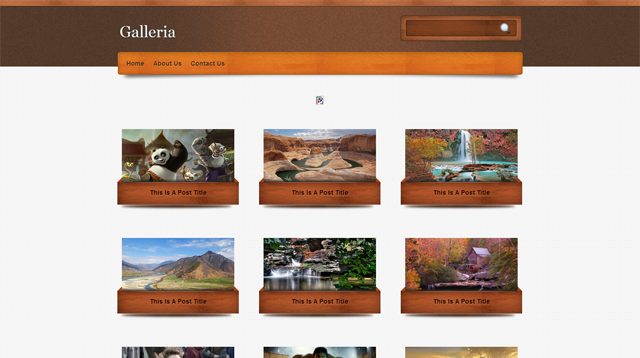
Galleria Blogger Template is another beautiful blogger template which is modified and converted by us from WordPress template.
Galleria Blogger Template is a blogger theme is a thumbnail style post and having a latest scrolling post style. It have a beautiful color combo. this theme has a disqus comment system, star rating and single post sidebar function etc. All template setting you will get in the template folder and if any problem happens please ask through comment.
Setting for discus comment system
First sign up at http://disqus.com/.
And create a site profile at there and then find disqus_shortname in your html template in extended form.
And your short name next to this.
So this template contains one versions.
hello,
thank you, I download templates form this site.
but I have a problem, how do I change menu on under headder on my blog ??
please reply my post .
PLEASE
Read the Intruction.txt
Yes, I have the same problem.
thanks. perfect working for wallpaper style images.
Thnks so much!!
Hi, I need your help here. I got a problem with disquss comment system. I want to change back the comment system into blogger itself.
How do i do it?
I tried to remove all disquss code in html code, but unfortunately the comment all gone.
Please help me by reply this comment and/or email me.
Thanksvery much.
how do i remove disquss comment system and change with usually ?
I have given a normal comment along with disqus comment theme. So download again please.
Hey please tell me how to remove disqus from template ??
can u upload ( WITHOUT DISQUS form of template ) ???
OK i will upload a new version with blogger default comment system…….
Hi, thanks for your theme.
I just have a simple question: how can I insert pictures in my gallery (The litlle thumbnail wich are moving when you rollover them)?
Thanks a lot!
Hi, thanks for your theme!
I’m just wondering how can I insert pictures in the gallery (le litlle picure which are moving when you rollover them in the main page…)?
Thanks!
A.
The scrolling widget called as spider. I have given all related information in the template folder. Powder refer that. And if you have any problem in setting this slider then contact me I will help as early I can.thanks
how do i remove disquss comment system and change into blogger comemnt system ?
I want to change DISQUS Comment box. How can I do it.
Go to dashboard > Design Tab > Edit HTML > Expend Widgets . And find ctrl + f the name disqus and remove all source.
I love this theme… but I dont know why all comments just not appears??
This is another comment system (Disqus) not a blogger.
I have see the demo., sidebar is removed in home page, but i have question: how to remove sidebar in post page, not in homepage or category page?? help me… thanks
I used this template… But in the home page when I click a thumbnail image it redirects to the image file. How can I change it to redirect to the relevant post???? Please reply soon….
my problem is i have only 7 box not more when i adding other post
the box will go to Previous
Go to Blogger Dashboard > Design Tab > Blog Post Edit Option > Number of posts on main page > Remove 7 post to your numerical number of post like 1,2,3,4,5,6,7,8,9…
when i write article and adding image and picture
in main page image mix together
ho fix that
http://www10.0zz0.com/2011/09/08/04/261395037.png
I really want to use this theme to replace the theme of my blog. on my blog in one post there are a few pictures. when i try this theme, on the home page of two images appear together in a single post.
please help me because I really want this theme. Thank you.
[code]http://3.bp.blogspot.com/-LYjo0ayFNXU/TnzA8gY-9gI/AAAAAAAAB0w/XXblg3DlH18/s1600/example.JPG[/code]
I have managed to fix the problems mentioned above.
http://template4ublog.blogspot.com/and also tell me one thing bro how to add share this widget at the end of the post….bcz when i put code after it appears before the title of the blog not at the end of the post? help me plz
Please send me your template with share button tutorial url i will add it for you…..
Thanks
here is a problem in this theme. In home page when i click to the picture it does not open the post but just picture.why?
Hi Faisal,
Thanks a lot for using our theme.
Please use a image html code like : <img class="poster" src="http://1.bp.blogspot.com/-z31SQ2zPHu4/TclgQYgIcMI/AAAAAAAAFL8/GdyNl1rlozE/s1600/kung-fu-panda.jpg" alt=""/>.
thanks
i cannt understand sir…..mjhe zara hindi mein detail se smjha dein….if you dont mind…
Hi faisal,
Sir?
Mere kahne ka matlab ki jao blogger dashboard > edit post or new post tab > Post edit html tab on top right of post editor > aur hata do pahle ka image codes aur waha pe paste kardo image html source jo maine diya hai aur image: http://1.bp.blogspot.com/-z31SQ2zPHu4/TclgQYgIcMI/AAAAAAAAFL8/GdyNl1rlozE/s1600/kung-fu-panda.jpg se replace karo naye image url se……
Thanks
will you design some other thumbnail themes for sites of fashion and jewellery or like wallpapers just like galleria theme…plz if you design keep their comment system simple….not of disqus… and also include share this widget in that….hmmmm i hope you will design some more thumbnail themes…i wait for your themes soo much…thank you soo much…tc
I will update a version with normal comment system and i will notify to you. I will try to create more themes in future with thumbnail posts.
thank you very much..Avinas…
Hi Avinas,
I have some question for you.why my post appear 7 box only??
supposed to be 9 post appear…please assist.tq
I think you had copied your stuff from another site or you had copied images from another site which is eval based 64 encoding coded image oe you are using windows live writer.
So please create your post with blogger post editor and also upload images via blogger default image uploader tools.
Thanks a lot for using our themes
Hello Avinas.
The template no has the lines:
div class=’post-footer-line post-footer-line-1′
div class=’post-footer-line post-footer-line-2′
div class=’post-footer-line post-footer-line-3′
How can I add them?
Very nice template i have also used this
need help regarding this template.
please any one or admin reply please.
in this template if there is two image it show both images and when click on that image it not open post but image…
please any one help me i want to use this template
yeah,
if post has two image it will overlap on another image how to fix that //
any solution
thanks
where can i download this template ?