
We have recently launched first forum which is specially created for blogger user who wants to get help and share their knowledge on blogger, WordPress, css, php and html. Please sign up for get help and share your knowledge. Best Theme Forum
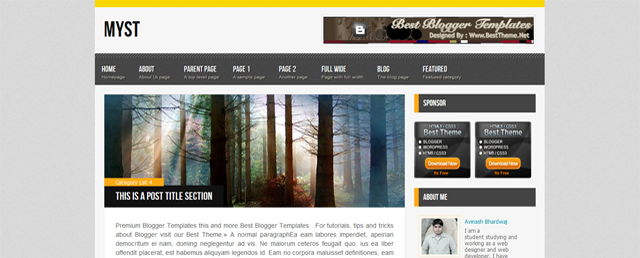
Myst Blogger Template

Share It

Myst Blogger Template is another beautiful blogger template which is modified and converted by us from WordPress template.

Myst is a nice minimal magazine Blogger design.It is suitable for magazine sites or tutorial sites.
I have added all instructions in the download folder and you can ask me any help via comment, Facebook comment.

Due to large number of comments comming on every theme, we are unable to answer every comment and mail.So please leave your question / problem in respacted theme thread on our Best Theme Forum.

22 Responses so far.

  1. Javier says:

    Hello. One question … how to make the button appear old entries on the blog? since it only shows me 6 post and the other entries I can not visualize

    Excuse my English, it is translated with google

  2. Cagatay says:

    Does the title does not seem to be more than 2 on the main page, please answer by mail. go4genc@gmail.com

  3. Elif Perde says:

    Best Blogger template.. Thanks..

  4. Rose says:

    this templete shows my Parent,Child menu..thx
    bt the problem is it shows only one OLDER button.
    after click on that it doesn/t appear on next page.

    please fix this.
    i have also tried custom navigation bar for.but it still desapperr after one click. please

    • First give me your blog url.

      • Abhi says:

        please tell someway to to STOP resizing the images.
        the images are getting BIG and BLURRED ..
        please tell how can i retain the image size.
        Urgent help.
        please

        • Go to blogger dashboard > Design Tab > Edit HTML Tab > Expend Widget > find ctrl+f JavaScript code given below and change yourself or remove it.

          <script type='text/javascript'>
          //<![CDATA[
          function bp_thumbnail_resize(image_url,post_title)
          {
          var show_default_thumbnail=true;
          var default_thumbnail="http://2.bp.blogspot.com/-erTXCq61ULM/TmHYAQBZ0GI/AAAAAAAACCs/6cBX54Dn6Gs/s72-c/default.png";
          if(show_default_thumbnail == true && image_url == "") image_url= default_thumbnail;
          image_tag='<img src="'+image_url.replace('/s72-c/','/')+'" class="postimg" alt="'+post_title+'"/>';
          if(image_url!="") return image_tag; else return "";
          }
          //]]>
          </script>

          Thanks a lot for using our theme.

          • Anand says:

            I tried it, i removed the whole script but it is not working. And one more doubt. i have put the image link in my post, but it is not getting desplayed in homepage – it is showing image not found. But when you click read more the image is displayed in posts.

          • swathi says:

            i m new to blogger, can u help me

  5. Sushil says:

    Best blogger template.
    I have used this one in one of my blog.
    as i mostly use templates of official blogger.
    but this time, this template forced me to change.
    nice, really.
    thank you very much,.

  6. reo says:

    Even outside the picture cannot be displayed on the home page

  7. Anand says:

    In instruction you have given “Please upload image with default blogger image uploading tools” What about images which are not uploaded in blogger. These images are not displayed in homepage.
    Please let us know how to display images which are not uploaded in blogger in homepage. Which will be very helpful and i need it badly.

    Thanks in advance

  8. Anand says:

    Hi Avinas Bhardwaj,
    Are you working on it or is it not possible to do.
    Please let me know.

    No use of visiting this page everyhour with no response.

  9. Anand says:

    OLDER Posts button, after clicking on it, disappears in next page.
    please fix this.

    Avoid downloading this template…..

    Only home page is impressive by showing part of the image post.

  10. hi buddie greetz from Colombia, i really like this theme but, i have one question, how change the yellow colour for blue, because my logo and colors is like that..

    thanks for sharing your work is real awesome

  11. Ankit says:

    please tell me how to make the post images appear smaller on homepage like this template http://besttheme.net/download/Bionic.zip

  12. muiz says:

    how to remove the header and description on side bar?

  13. Eric says:

    When I preview the Myst theme, none of the post images appear n the main page. The Top Posts images appear and when I click on a post, the image loads on the opened page. Is it a size issue on the main page?

Leave a Reply


Premium WordPress Themes, Blogger Templates, Mobile Themes | ThemesHive