
We have recently launched first forum which is specially created for blogger user who wants to get help and share their knowledge on blogger, WordPress, css, php and html. Please sign up for get help and share your knowledge. Best Theme Forum
Shutter Shot Blogger Template

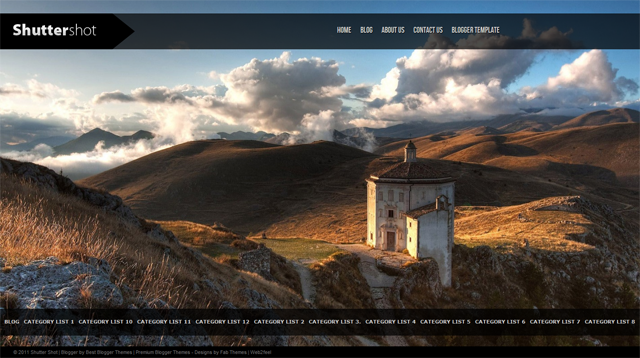
Shutter Shot Blogger Template is another beautiful blogger template which is modified and converted by us from WordPress template.

Shutter Shot Blogger Template is a blogger theme is a tumble style post and have very nice use of JS so there is fullscreen slideshow design. This is very nice template with is a very good if you are interested to create your one portfolio blog.
This theme is ideal for photography websites to showcase their portfolio in style.

Due to large number of comments comming on every theme, we are unable to answer every comment and mail.So please leave your question / problem in respacted theme thread on our Best Theme Forum.

63 Responses so far.

  1. Kami says:

    Is there a possiblity to change the bottom labels? I want a link that will show the recent or all posts. Having only labels there is difficult for readers coming to the site and seeing “whats new”. I love the theme though!

    Thanks!

  2. Maria says:

    Beautiful template!
    To adjust the date, what is the combination?

  3. Ehab says:

    Hi there ,
    this theme is awesome ! am planning to use it on my blog ,,, so congrats on the great Job :D

    though I have one question if I may ask :D

    how to disable the “full screen awesome” slide show while on the blog mode ? I mean I prefer to keep it on Home page only !

    is that possible ?

  4. Agustín says:

    How did you do to get the “categories” in the top menu to have that special font?

    THX!

  5. Sneha K says:

    Hi,
    I am using this theme.
    I wish to make 2 changes:

    1. the header where the pages links are shown, I want it to be fixed on top and don’t come along when i scroll down…how to fix that?

    2. the context wrapper is so small. I want it to be little wide so that it covers good amount of screen. How to achieve that?

    The theme looks gr8 Thank you :)

  6. Valencia says:

    Hi, I have a quick question.

    When you click on the tag/category, the pictures are resized. How can I not make it resize? Make it whatever size for the photo?

    Thank you!!

    PS: GREAT DESIGN :)

  7. Hello Vikas,

    I sent you an email as I want to buy a custom template for my blog. Please answer me as soon as possible. Sorry, but I do not speak English very well;).
    I’m Brazilian.

    Congratulations! His work is wonderful!

    Thank you for your attention,

    Lucy :) )

  8. nigi says:

    nice work.keep it up

  9. roberto says:

    hello good day I have a question you do template for blogger
    now charged as a template for making personal, or so I have the design
    jpg sample in as I need, please quote me this job
    My name is Robert Best Regards

  10. roberto says:

    This template is awesome, I have a question about this template, you can add more columns as is done without changing the content ..
    Best Regards

    I can provide mail, Avina Bhardwaj,
    I am interested in your work please ..
    thank you very much for your attention

  11. rc says:

    [code] hi first great work this great theme .. I am also interested
    for their work have already sent an email for a custom design ..

    2. This template is great, my question is how can change columns
    to 4 columns, you can?? thanks guys are great ..
    Best Regards [/ code]

  12. Martin says:

    This is another excellent template! Thank you very much for the addition of this template.

    May I request you that please try to add more quality templates regularly in your site, so that we may get always the best from your site by visiting frequently without having to search all over the net.

    I’ll be much obliged! To your success! : )

    Regards
    Martin

  13. Marta says:

    [code]I can't use this amazing template! :(
    All the words (Home, Blog, etc.) are gone....
    And I don't know what to do.
    I hope you can answer me ASAP
    Greetings! [/code]

  14. Hussein says:

    hello there,
    i have a question please and please reply me quickly as soon as possible i want to know how to enable the sharing buttons on this template i did try from the design tap —- page elements —- blog posts and checked the box but still didn’t show up for me can you tell me pls how to do that?

  15. valek says:

    hello anyone can help me or say if the columns can aunmentar
    for static pages pages to blogger
    thank you very much .. Best Regards

    attached an example ..

    http://1.bp.blogspot.com/-mZvwAoPLPE8/TmEPmsTKQhI/AAAAAAAAAD4/mj3pAxbkb6c/s1600/shutter.jpg

  16. Oland says:

    How to remove and change the Shuttershot in the upper-left?

  17. Como posso editar o menu do template?

  18. Onesha says:

    Hi, the template is great I’d like to know even though waht happened to the blog, home, contact ñinks at the top bar? when I installed it they all dissappeared so I just see an slide but no links :S it makes me sad ’cause I really wanted this template. Looks very cool.

  19. mizie ahmad says:

    hi, i like this template so much. can i know, is it possible to change the width of the post? since in your instructions said that the picture will be fixed to 600 pixels, can i expand post width it to 1000 pixels as example?

    try to do some changes in ur html code in the blogger, but cannot find where should i change it.

    thanks.

  20. Crazypinoy9 says:

    is there any way I can control how much it zooms the picture in for the slideshow? I’ve read the instructions from the zip but it only explains how to img src the picture. I’ve tried uploading up to 14mp pics but it zooms in too close and causes the image to get slightly pixelated.

    Any idea?

    • Crazypinoy9 says:

      So far I’ve tested everything on a 24inch monitor @ 1920×1080, a 14inch laptop @ 1280×960, and an HP touchpad @ 1024×768. The only device that seems to display the slideshow correctly is my Touchpad.

  21. Crazypinoy9 says:

    i’ve tried hosting sites like flickr, photobucket, as well as smugmug if that helps

    • No I have not tried this site, but you can use them. The problem is with Blogger sites because it can’t resize images so if you have larger image that will ruin your site. So stay on default like pikasa.

  22. mizie ahmad says:

    hi, i love ur templates so much and i wanna use for mine blog.

    is it possible to extend the posting width? since my previous blog use picture larger than 600px, but when using this template, the picture shrink and look ackward.

    need help. thanks.

    • I have added a script that will resize your image in the single post, so I don’t think you need to worry about the image size. But I will recomennd that please check this on the demo site before using on your actual site.

  23. Diego says:

    Hi, this is one of the most beatiful templates I´ve ever seen. Thanks for it.

    Could you tell me how can I add a “Read more” button?

    Thanks again

  24. zen says:

    Nice template, but the “older” and “newer” does not seems to work

  25. D says:

    My pictures are not doing write when its to big they cut off parts and when to small the picture becomes distorted the question is how exactly do i size it correctly

  26. zeewang says:

    i have installed this theme on my blog. its amazing. but my all post are not showing. it is only showing 10 posts. no older post link is there or page navigation to see older posts. please guide me.waiting for ur reply. thankx

  27. hitesh says:

    such a g8 template, very nice work,
    i found a WordPress theme that nice try to convert that and modify some area it’ll look very good.
    thanx for template

  28. ballestaz says:

    Hello, great blog, I edited it and I want to show all my entries in the Index, how can I do for show all the content????

    thanks

  29. DOUG SILVA says:

    Good morning, first congratulations for the layout, very good.
    I’m having problems in the post. I do not know how to remove the resized image of the initial post. I would like a guide to get the image in original size and not the banner. thank you

  30. sebastian says:

    Hi guys, download this template because it is excellent, congratulations!
    I have a question for them:
    You can change the links of the tags for the links of my entries?
    I hope your help, thank you and hits guys!

  31. How to change the font size for the main title of posts in posts view? its very large and annoying due to you need to scroll contineously for other posts.

  32. Congrats on such a great theme :)
    I am using it on my blog now but the problem is,
    when opened the post, text appears next to the image in the post.
    sorry for my poor english. If you dont understand what I want to say then please see this post:

    http://premium-books-for-free.blogspot.com/2011/12/hottest-niche-tune-into-it-and-make.html

    waiting for a solution

  33. kun cheng says:

    how to remove the logo at the top left corner?

  34. cying0121 says:

    After I upload this template, it shows
    ‘We were unable to save your template

    Please correct the error below and submit your template again.
    Your template could not be parsed as it is not well-formed. Please make sure that all XML elements are closed properly.
    XML error message: Content is not allowed in prolog.’

  35. JEAN says:

    My post are not showing. it is only showing 10 posts.
    no link this is that post or page navigation to see older posts as I can add links to old posts? please help me.

  36. Shawn says:

    Hi

    nice job & nice design

    but I found a problem

    Showing posts with label Category List 1. “Show all posts”

    “Show all posts” is out of function

    can you tell me how to fix that?

  37. Thank you so much for providing us the tools others don’t, you’ve been very responsive! I hope this isn’t the exception. I’ve decided to keep all my tabs on the top and want to have Twitter feed scroll across the footer (where Labels are). I already have the html to do so but i don’t know where to enter it.

    Could you help?

  38. Marco says:

    The template is great, I’m working on fixing a trouble.
    When I click on “read blog” it show just one post, the last one, also I can’t add the break at the end of a post preview.

    What to do ?

  39. Timothee Atenda says:

    i am trying to use this shutter dsign but when I test it vrything is fine expect when i click on a label it shows me 7 post then if i click show all posy t brings me back to the main page… How come?

  40. Timothee says:

    I am trying this template and so far so go. I put about 30 testing post to see how it would work and they all showing well except for one thing when you click on the labels it only shows 6 post for each labels ten when you click on show all post of a label( atlanta for example) it brings me back to the main page?… how can i see all the post from a label?thank for the help and for the template

  41. Pete says:

    isn’t it possible to just have all messages apear on the home page as most of the regular templates? i mean, i love this template but i’d like to get to the blog and having the column there with all the posts…

  42. tom says:

    Hey Avinas, absolutely loving this template, good on ya.

    just 2 quick questions if you have the time answering,

    1. how do i get rid of the bar at the bottom of the page when im on the homepage?

    2. also, is there a way of assigning an already created page to show all my blog posts from most recent to most oldest?

    cheers in advanced!

  43. daemon villamil says:

    hi there… was experimenting with different themes for my blogger… and i love your theme…

    anyway tried to view it on my ipad… but the header (link list) was out of place…

    you know of any way to fix this…

Leave a Reply


Premium WordPress Themes, Blogger Templates, Mobile Themes | ThemesHive