
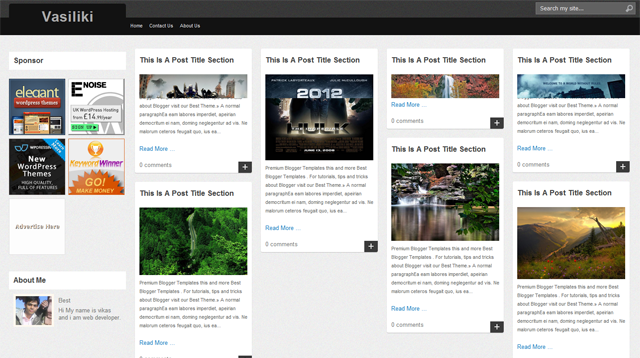
Vasiliki Blogger Template is another beautiful blogger template which is modified and converted by us from WordPress template.
Vasiliki Blogger Template is a blogger theme is a jQuery masonry – A dynamic grid layout plugin and It re arranges the content grids in a brick fashion with smooth animation according the browser window size. This is very nice template with is a very good if you are writing your news blog and want to share different updates, images, videos and more with world then this is a template for you.
Thanks for your template! I very like it! I using it for my blog and I have a problem:
- I can’t add more widget in “Blog Post”. You can try it!
Thanks for your help!
Have a problem? We see only two columns
http://www.comunicar.mobi/
I think you are using xp OS. If you want to see 4 column then you need to upgrade your OS.
No, i used win7!
I think you have removed some Javascript code code ?
Now create a new blog then install these theme again and also make new post then your blog is automatically solve 2 post in a line problem.
It still works in other notebooks or other browsers. Suggestions?
hello..can you help me?i need templates for my blog.i need movie templates and please help me how to post movies on the blog..thanks
Dear. Avinas.
I got your template.
It’s really great~!!!
But I have serious problem….
I can see navbar…
How can I go to management page?
Pls let me know
and sorry for my bad English.
Thank you your great template.
-David.
Hi, i have given all related setting information in the theme file. Please refer this. By the way navbar is a linklist widget without title.
Thank you so much~^^
I didn’t read that.
Thank you^^
Have a nice day!
bro, what about blogger auto pagination…..
i can see only 4 posts on the page…
please can you tell me how you published no. of posts on the main page….
please sir its urgent!!!
i found the solution xD, u only need add “insert expansion of posts” on your post, and will solve your problem xD, now it’s perfect
I have one Problem, can you fix it?
http://i1193.photobucket.com/albums/aa356/coldboy166/1-1.jpg
dude, try to cut the sentence… try space btn them….
@Hiep: dude, try to cut the sentence… try space btn them….
I have a problem.
http://i1193.photobucket.com/albums/aa356/coldboy166/1-1.jpg
Can you help me?
i have the same problem from deepak, only show 6 post on home page and when u click next page, u will see 5 post, next 4, next 6, crazy… if i set to see 4 post per page, it work perfect, but 4 post is too little… his blog probaly have some diferent code from the code from download.
Hello, friends. I have this problem with post:
“POSTED BY IDAFE ON UNDEFINED – UNDEFINED”
How can I fix the problem with the date of the post?
this template has a problem in css single page and main page, please fixed it.
#mason-content {
clear:both;
padding:20px 0px 0px 0px;
margin:0px 0px 0px 0px;
}
i have fixed.
Can u help me? how to add our own logo to this template because i dont know about css.Thanks
Yah i will help you you need to download your full template then create a logo PSD and send it to me via mail.
Hi Avinas,
I really love your template and I’m using it at the moment. But I came across a problem, I wanted to have 15 posts on the main page, but the max posts I can have is 12. Although I’m ok with 12 posts, sometimes it shows only 9 or 8 or 10 or 12 posts at different times.. is there a way to fix this problem?
Thank you.
I want to add a right sidebar to your blog template as the space in the right is emplty after 3 column layout.can you please tell me wat all changes i need to do in code for that
besides loved your template.
anki
i love your template
btw i have a problem
why ‘Showing posts with label’ is appear in the top of the layout?
it suppose below the posts
how to fix it
i’m sorry, one more thing. i’m struggling to change h1 logo to my image logo…can you show me the way
thank
OK download full template and send it to me via mail with logo image url.
Thanks a lot for using our theme.
I am sorry i had forget to hide it so you need to remove yourself with a tutorial : How to remove “showing post with label” in Blogger
Thank you for the template. Best combo of the old design and new dynamic setting.
1) But its only “dynamic” when I use other browsers than IE. I eg. have no problem when using Chrome or firefox. Or have I misunderstood something?
2) When you wish to see all entries under a specific label/tag I encounter a unwated situationen. Below the entries you find one sentence (stating – your now watching all entries with X label). If you do have a solution, or ideas, how to avoid this, I would appreciate it very much.
Cheers Thor.
Dear Avinas,
thank you very much for your great template!
I’m modifying a bit your template since I’m trying to do a very dry version.
http://lay-out-web.blogspot.com/
Can you help me on few problems:
1. when search in the blog (this also in your original demo), when the results are displayed ther is an overlapping of the text “Showing posts for query post. Show all posts” with the posts’ windows. How to solve it?
2. The footer doesn’t scroll down if you reduce the width of the browser’s window. The posts overlaps with the footer.
3. Would be possible to have the “Page Navigation” element as a “footer” that stays always in the bottom and changes width according to the width of the page? Or as alternative joined with the “Search Bar”?
4. Image captions 1: when you put a caption on the image the caption appears in the visualization of the Home Page without any break with the text. How to insert a break between the caption and the text displayed in the box?
5. Image caption 2: when you put a caption on an image a frame appears around the image in the Post Page. How to eliminate it?
6. Would be possible to format the Post Page so that the image and the text (justified) have always the same width, with the image enlarging or shrinking proportionally?
Hope you can help me!
Anyhow thank you very much for your precious job!
WHAT A TEMPLATE,
idafe says:
September 21, 2011 at 7:19 pm
Hello, friends. I have this problem with post:
“POSTED BY IDAFE ON UNDEFINED – UNDEFINED”
How can I fix the problem with the date of the post?
I have the same problem. Anybody knows what to go?
Nevermind fixed it