
We have recently launched first forum which is specially created for blogger user who wants to get help and share their knowledge on blogger, WordPress, css, php and html. Please sign up for get help and share your knowledge. Best Theme Forum
Wallbase  Blogger Template

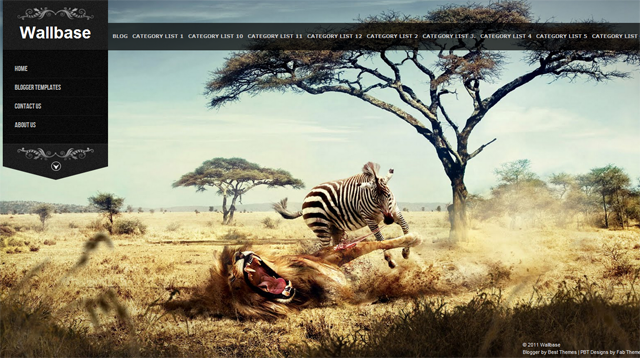
Wallbase  Blogger Template is another beautiful blogger template which is modified and converted by us from WordPress template.

Wallbase  Blogger Template is a blogger theme is a tumble style post and have very nice use of JS so there is fullscreen slideshow design. This is very nice template with is a very good if you are interested to create your one portfolio blog.
This theme is ideal for photography websites to showcase their portfolio in style.

Due to large number of comments comming on every theme, we are unable to answer every comment and mail.So please leave your question / problem in respacted theme thread on our Best Theme Forum.

131 Responses so far.

  1. ΜΗΤΣΟΣ says:

    THIS THEMES HAD A PROBLEM
    ITS NOT APPEARS OLDER POST OR NEXT POST LINK

  2. Jay says:

    How do i get rid of the transparent bar and tag links?

  3. Jay says:

    Also, how do i get rid of the black line that is under the navi bar?

  4. Rach says:

    Nice one… Thanks for sharing

  5. Ravi says:

    wow super template keep it up

  6. gofree says:

    Can that full screen image be linked – let’s say to specific post?

  7. *M*J* says:

    nice template!!!
    but how i can put the link “blog” in the label menu and in the main menu like in the demo????

    • Kissingfish says:

      Just to get the answer up higher (and a bit clearer)

      TO ADD Page List in navigation bar
      (this is how to fill out the horizontal nav bar at top)

      ALL YOU HAVE TO DO
      is create more than one PAGE. You dont have to add any widgets. When you complete your second page in the page editor, Blogger will prompt you and ask if you’d like to add the pages to the NAV BAR and whether you want them listed on the top or the side.

      That’s it! So simple. I was struggling thinking it would be complicated.

      -kissingfish

      • Kimberly says:

        I read the instructions and I do not see how to change the bar across the top. It only shows a limited number of labels, which is ineffective. Please Avinas Bhardwaj – tell us how to change it. Many people are asking.

  8. Wallpapers says:

    once again, you give us awesome blogger template.
    Keep inspiring, buddy!

  9. Alessandro says:

    beautiful templates, how do I put the buttons in the social bloggers post ?

    Ciao Sandro

  10. Captivus says:

    How do you edit the top menu going horizontally? I love this template! Could someone help me out with that? It automatically put my labels there but when I go to page elements the widget is not there.

  11. Ricardo says:

    How do you edit the top menu going horizontally? I love this template! Could someone help me out with that?

  12. barnabasp says:

    I need a little help please. I can’t seem to find a way to control what appears on the upper horizontal navigation bar. It just keeps displaying all my labels, very annoying. I have way too much labels on my blog so it really doesn’t help navigating.

    The Instruction that comes with the template says
    “Go to layout and click on add new widget on the top of posting named linklist / Top Menu / Menu etc
    And add link widget to it and remove its title.”

    Well, chances are, I don’t understand this. What shell I add to where, naming what, and why should I remove its name after I renamed it??

    Sorry, I just think this one is too good not to work. Can you help me how to understand those instructions? If I could just show a simple list of links instead of all my labels, that would be awesome. If that’s even possible.

  13. kARAKAKSA says:

    Amazing tamplate!

    …but i have some problems…

    1… I would like to have a longer post space…. and longer side menu

    2… In the side menu there is my blog title… tell me a way to clean it from there… and put it , in the main title…

    3… Nice job by the way!!!! Keep good work!

  14. Jud says:

    I have page links, but I don’t understand how to edit the navigation bar. I add a links list, but then what?

  15. just my advice…
    how if you made ​​a different shape or color for the comment’s author and the visitors.

    Great Work :)

  16. vicente says:

    Me gusta mucho la plantilla, y me gustaria saber como cambiar las cinco fotografias que salen en el diseño por otras fotografias hechas por mi, gracias.

  17. Streicher says:

    i download your template and its freaking awesome!
    but i have some problems i dont found where i change the widgets
    i look everywhere and dont found it…!
    can ou help me with taht the instruccions are not very clear :/

    • Please download again Wallbase Blogger Template.I have added all instructions in the download folder so you need to read and follow the given instruction.

      • Another Issue says:

        Hello! I appreciate your time in this, but it is very unclear how to create the horizontal menu across the top of the screen. I see a lot of other people have this problem. Can you please just explain it yourself?

        • Another Issue says:

          okay, it works now. All I did was delete page widget then add a new page. It automatically asks if you would like to insert a page toolbar and I picked the horizontal one and suddenly it appeared. yay :)

          other than that, thanks for an awesome template!

  18. MUXLIMO says:

    Bro.. how to show the blog’s description in this template?? I really need it showed on shared posts. Thanks.

  19. Hussein says:

    it doesn’t show up the share buttons and these buttons are so important for me so please tell me how to add them to this template i tried all of the ways but no way to show them up :(

  20. ofp.prieto says:

    Solo hablo español pero te tradusco lo que mas pueda mira el blog http://ghostofsea.blogspot.com/ lo cree pero tengo problemas con los menus lorem 1 en adelante no se ven y tampoco las entradas que creo como hago Gracias por tu ayuda y excelente trabajo

  21. ofp.prieto says:

    Solo hablo español pero te tradusco lo que mas pueda mira el blog http://ghostofsea.blogspot.com/ lo cree pero tengo problemas con los menus lorem 1 en adelante no se ven y tampoco las entradas que creo como hago Gracias por tu ayuda y excelente trabajo

    I only speak Spanish but you Translates what else can look at the blog http://ghostofsea.blogspot.com/ believe it but I have problems with the menus lorem 1 upwards and there are no entries that I think as I do Thanks for your help and excellent work

  22. Christopher says:

    Fantastic template!!

    One question – How can I made the main blog area wider? I found where you can change it from 500px but if I make it wider (say 700px) the “archive” section on the side of the blog is pushed to the bottom. How can I make it so that it stays up next to the main blog area?

    Thanks again for the great template.

    – Christopher

  23. yunus emre says:

    hello ı cannot add categories list on my homepage :S can you please tell me how to do it? thank you

  24. Akito says:

    how to change bar on the top(BLOG CATEGORY LIST 1 CATEGORY LIST 10 CATEGORY LIST 11 CATEGORY LIST 12 CATEGORY LIST 2 CATEGORY LIS) to text only. that describe my blog…
    please tell me…

  25. Ro says:

    è possibile avere Wallbase con il menu a discesa del template Cromatic?

  26. Febryant says:

    How do i put facebook like button to this template? I can’t find

    please help me…

  27. Joey says:

    This is my website, http://www.fckyourcrew.com
    How come it loads so slow? And i only have one picture on the slide…

  28. sunflr says:

    How to change the background slides pictures?

  29. Henry says:

    The left side panel worksgreat, it shows my pages. The top horizontal one should show the title of the main blog posts, doesn’t it?

    My horizontal bar doesn’t show anything and I can’t follow the directions provided, can you help me?
    Some say that they added a new page and accepted to install a page widget, well it doesn’t help me because I don’t want pages on there, I want the posts

  30. Danilo says:

    I downloaded a template and it came with the hack Read More automatically and I tried several ways to remove this hack more I can not. Please tell me how to remove!
    Template: Wallbase

    • Login to blogger dashboard > Design Tab > Edit HTML Tab > Now find ctrl+f javascript code given below and remove it.

      <script type='text/javascript'>var thumbnail_mode = "float-left" ;
      summary_noimg = 375;
      summary_img = 375;
      img_thumb_width = 500;
      </script>
      <script type='text/javascript'>
      //<![CDATA[
      function removeHtmlTag(strx,chop){
      if(strx.indexOf("<")!=-1)
      {
      var s = strx.split("<");
      for(var i=0;i<s.length;i++){
      if(s[i].indexOf(">")!=-1){
      s[i] = s[i].substring(s[i].indexOf(">")+1,s[i].length);
      }
      }
      strx = s.join("");
      }
      chop = (chop < strx.length-1) ? chop : strx.length-2;
      while(strx.charAt(chop-1)!=' ' && strx.indexOf(' ',chop)!=-1) chop++;
      strx = strx.substring(0,chop-1);
      return strx+' ';
      }
      function createSummaryAndThumb(pID){
      var div = document.getElementById(pID);
      var imgtag = "";
      var img = div.getElementsByTagName("img");
      var summ = summary_noimg;

      if(img.length>=1) {
      imgtag = '<div class="postimg"><img src="'+img[0].src+'" width="'+img_thumb_width+'px"/></div>';
      summ = summary_img;
      }
      var summary = imgtag + '<p>' + removeHtmlTag(div.innerHTML,summ) + '</p>';
      div.innerHTML = summary;
      }
      //]]>
      </script>

      now click save button.
      Thanks

  31. Ro says:

    sorry help me… not appears older post or next post link at the bottom of the blog :( thanks

  32. wolf222 says:

    how can i stop the slider?
    and how can i put one foto of mine

  33. George says:

    Great theme. But the horizontal bar shows only labels? Can it shows pages? I need it so! Please, help me.

  34. kamen says:

    hi

    how to change word title to image?

  35. ranya says:

    please,

    i want to add facebook comments to this theme but i couldn’t please help me?

    • kerah ledrek says:

      blogger -> dashboard -> desain -> edit elemen -> add gadget, then copy paste this code below:

      change text : “your facebook url” into your own facebook address bar profile.
      Good luck.

  36. rags says:

    how to add more than 5 images in the background.?

  37. Katie Gundlach says:

    Question: I have some very short blog posts but they still have the “read more” link under them. Is there a way to counteract that? especially when the blog is less then 100 characters long?

  38. ondra says:

    Great Template, Great job. Thanks!

    First questions are about font/text in main menu.
    What should I edit to make the letters bigger/better readable? They are so close each to other and spaces between words are so small that they are not so comfortable to read.
    in my blog for example “KDY A KDE” looks like “KDYAKDE”

    I use letters of my national alphabet which looks different than rest of the word/text. Is there any solution for that?

    And last question: I use one subpage “VZKAZY SEM” like a simple guestbook to write comments. Even if I left the page empty, the guest book and first record is in distance from the head title. Is there any solution for that?

    Thank you for your time.
    Ondra

  39. Hello, I wonder how do I change the name of the page image.
    Where is INSTRUTELL writer, I want to put a logo, you can tell me how do I do?

  40. ondra says:

    thanks for your quickly response in my prewious questions!
    i was able to modify font and readibility:-)

    how can i minimize space between embedded comment form and title of empty page? i created just empty page and allowed comments – like a simple guestbook. as you can see in “VZKAZY SEM”

    how can i set to load the page with menu closed and waiting for user to open it for first time?

    thanks for answers.
    Ondra

  41. giorgio says:

    excuse me, i have a question….i want to change font and size of the horizontal menù on top…what i have to change ??
    i want to use google web fonts for this menù…i can ? how ?

    thanks so much….

    • Hi,
      Go to blogger dashboard > design tab > edit html tab>now find ctrl +f code given below.
      #bottomhead ul li a {
      color:#ccc;
      font-family:verdana;
      font-size:11px;
      font-weight:bold;
      text-transform:uppercase;
      line-height:4px;
      }

      Now change font-size yourself……
      Thanks a lot for using our theme.

  42. Ro says:

    Hi, I have a problem with your template, if I click on “show all posts” in the blog … I see the home page and not on older posts. Can you solve it? thanks

  43. Ro says:

    II° problem: You can add a script to display the larger image in each post, and the small picture in the post cut with read more? Thanks, Roberta :)

  44. dharmesh says:

    hi,
    When i upload the theme “XML error message: The end-tag for element type “b:if” must end with a ‘>’ delimiter.” This error is come ..
    Please tell me solution of this error..

  45. Ro says:

    Hello, I always:) you can tell me all the code in the vertical menu on the left, where there is written wallbase? I would like to insert the same in my blogger template, add your credits:)

  46. Vignesh says:

    One the amazing templates i have ever seen. Great job Bharadwaj. I am proud see that the designer of the template is an Indian.

  47. hey man I was wondering if there was any way to make the main blog wider And remove the bio etc on the right side like this guy did?? http://www.fckyourcrew.com/search

  48. Lo says:

    How do I change the image sizes in the posts? If you click ryan hadley at the top, you can see that the new post images are huge and I want to make them smaller.

  49. alvin says:

    Hello Avinas,
    have you fix the ‘older post’ and ‘newer post’ now ?

    :)

  50. Cameorn Sivley says:

    The menu is not working corectly in internet explorer. When the page loads the bottom part of the menu bar covers up the title of the website. I have looke dat the code but im new to html so i couldnt figure out how to fix it. it works in firefox, chrome, and opera just not internet explorer.

    Also how can i change the images for the menu bar? I need something silver or white. If posible.

    Thank you for your time.

  51. George says:

    I cant understand how category lists such as demo works..I have made a post and add a label but nothing shows please help..

  52. anton says:

    Hello. Is there a way to remove the meta box on the page? and also the sponsor box? thanks for a great theme

  53. Hi, none of my browsers seem to recognize the BebasNeue font… I don’t know why, I checked the HTML and everything seems to be normal. On the main menu, it shows only Arial and no Bebas. What can I do for it to show Bebas? Thanks :)

  54. Gabor says:

    Hi Avinas, The posts don’t appear on the main page only in the archive.

    If you click on BLOG, the main page is empty.

    http://gaborpalinkas.blogspot.com/

    Thanks!

  55. dharmesh says:

    in this theme Older post Button Is not working..
    When click on Older Post the page is redirect to home page.
    Please tell me the solution of this error….

  56. Ali says:

    How can i change its logo … Please let me know .. It says the image should be square and less than 100Kb

  57. Serialgod says:

    Hello Avina. I would like your help to change the title of the template with an image. Is it possible? Thank you!

  58. ilynn says:

    Hi Avinas,

    Love your templates! I hope you can help me..
    I was wondering if I could have share buttons (twiiter, fb, rss, etc) & search box to the horizontal bar?
    I would also like to omit the “Read more” because I dont really use them.
    Also, each posts’ share buttons are missing.
    Can you help with this?

  59. Marina says:

    Hello, I am from San Jua Argentina.
    I like very much this template, but I have a question.
    Can I use it with Windows Live Writer??? because I can`t.
    This is my page http://www.marinaytribalash.blogspot.com
    Thank you

  60. Prayag Verma says:

    This template is awesome !!

  61. Esco says:

    Hello Avinas,
    First, my congratulations for your template. Really good for an artbook on blogger. Thank you very much for sharing with us.

    I’m working my blogger with your template and I don’t find solution for some problem:

    Can I recover ‘older post’ and ‘newer post’? or instead, It’s possible to view more than 20 entries with the same label?

    And I can’t see videos with embed code in the area of main content, Only I can view the video if I acces directly in the entry.

    Thank you for your consideration an your time.

    (If you have interest my blog is: http://escoyguilmon.blogspot.com/ )

  62. katrina says:

    I have a couple questions

    The only way I can access my blog posts is by clicking on a separate page, such as my contact page. The blog archives are then on the right hand side. How do I ad my blog posts as an actual page? When I go into layouts everything says not applicable for this template. there is no widget button anywhere. I know how to add a page, but how do I get my blog posts onto that page?

    Also how to I take the hyperlinks off of my page links?

  63. Dan says:

    Hey,
    So I have a music review blog which can be found here http://www.99problemsmusicreview.org and I was wondering if there was anyway to speed up the load time that the jquery slideshow seems to be slowing down so much. Thanks guys, and get back to me ASAP I have alot of followers with complaints haha

  64. Boudewijn says:

    Hi Avinas, great theme!
    I’ve got some questions:
    1) it is possibile to show a sidebar for only one page (and hide for all the others?)

    2) Is the “Next page bug” solved?

    Thanks for everything and have a good year

  65. Shawn says:

    Hi
    nice job
    but I have some problem about
    if you use the” Show all post”

    ex:
    Showing posts with label Cool Things. Show all posts

    the blogger will back to homepage
    can I fix this??

    and newer older button can I have them??

    THX a lot

  66. Mark says:

    Thanks man, I love this template and like to think I’ve managed to tweak it to make my own blog all the better! Good job! My only complaint is the same as some of the others above; that when I browse posts by tag it only shows the most recent with no “next page” option to see my older posts; sadly this might be causing me to move on to a new template, but otherwise this looks amazing!

  67. Yes, have you found a way to fix the older posts/newer posts menu? I really need them, and a lot of people have been asking. I’ve tried to add them myself and I’m not having much luck. Other than that, I like this template, but it’s useless without being able to navigate properly.

  68. lilia says:

    Hi, I just wanna know how can I make the pics on the slideshow fits on any screen… I mean, all the pics look pixelated =( and looks horrible! Do I need to upload pics with an specific resolution or something like that?

    Please, I need your wise advise ^_^

  69. Cheryl says:

    Hi Avinas, thank you SO much for sharing this template. I love it!

    I’m trying to edit & replace the gray background image for the drop down menu. So far I’ve figured out mast2.png for the top part, and botmen2.png.

    http://2.bp.blogspot.com/-t-Hl6PUmdTs/ToFyayJlzDI/AAAAAAAAAxU/w_HkBIBn3h0/s000/mast2.png

    http://3.bp.blogspot.com/-e7RZaDl68Gw/ToFyangs_EI/AAAAAAAAAxQ/nYAi2RJhJas/s000/botmen2.png

    But I can’t find the bottom part (arrow-like shape), and the small arrow in circle and the bottom. Can anyone please help?

    Much, much appreciated!

  70. katrina says:

    I will ask this again. How do you get the blog as a page? The only way I can access it is by clicking on the archive list on the side of another page

  71. Jayesh says:

    The most amazing and best template as flash/J Query is concerned, I have ever seen.
    Great work.

  72. Munir Taufik says:

    I am very grateful to you, because templates are very unusual.
    Visit my site :
    Entertaiment

  73. malu says:

    how to replace the text at the top for a picture. png?? just put the http:// in did not work :(

  74. Ana says:

    show de bola, o meu ficou do jeito que sempre sonhei!!

  75. Morg says:

    Hi,

    Im trying to edit the “Read more …”- text under each new post.
    Cant find it in HTML.

    Any clues?

    Morg

Leave a Reply


Premium WordPress Themes, Blogger Templates, Mobile Themes | ThemesHive